


How to Choose the Right Size Computer Table Guide

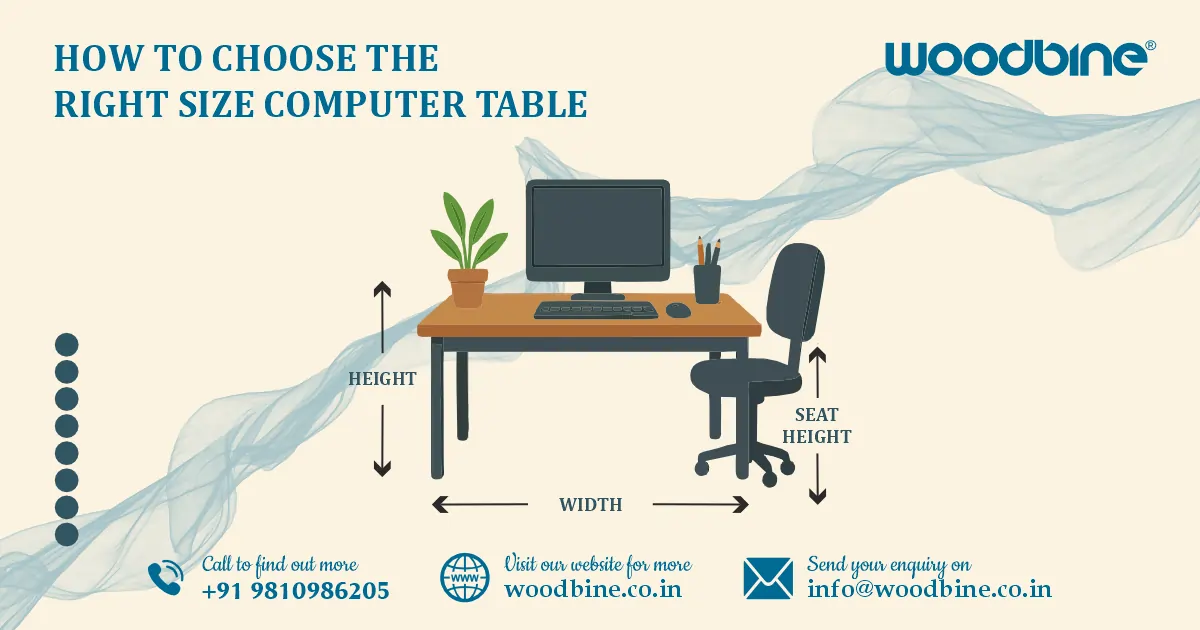
Choosing the right size for a computer table starts with understanding your room dimensions, how much equipment you use, your posture needs, and the type of work you do daily. The best table size balances comfort, functionality, and available space—whether you need a compact setup for a laptop or a spacious workstation for multiple screens. A well-sized table improves posture, increases productivity, and keeps your workspace clutter-free.
Introduction
If you’ve ever bought a computer table that looked perfect online but felt strangely small—or huge—once it arrived, you’re definitely not alone. After helping customers for over 10 years, I’ve noticed one major reason this happens: most people don’t know what size they actually need. The truth is, the right table size can completely transform your comfort, posture, productivity, and even your room layout.
In this guide, I’ll walk you through everything you need to know about choosing the right size for a computer desk, whether you’re setting up a study table, a computer table for home office, a gaming setup, or a compact workstation. You’ll also see real examples, expert tips, and smart ways to measure your space so you can pick a table that works for you—not against you.
Read more: Office Table Buying Guide: Ergonomic Picks & Smart Ideas
Why Size Matters When Choosing a Computer Table
Comfort, Productivity & Long-Term Use
The right-sized table plays a huge role in how comfortable you feel while working.
- A properly sized surface keeps the keyboard at a natural height.
- You have enough space to move the mouse without bumping into things.
- Your monitor stays at a safe distance from your eyes.
- Your back and neck stay relaxed while typing or reading.
When I switched from a small writing desk to a properly sized ergonomic computer desk, my wrist and shoulder pain disappeared within a week. That’s how much of a difference the right table can make.
Fit for Room Layout & Function
- A table too large can make your room feel cramped.
- A table too small can steal away your comfort and work efficiency.
For example, if you place a big gaming computer table inside a small room, you’ll constantly bump into it or struggle with movement. On the other hand, using a tiny compact computer table for dual monitors creates clutter and frustration.
Measure Your Space Before Selecting a Table
Understanding Room Dimensions
Before checking designs, measure your space:
- Wall length
- Floor area
- Walking path
- Corner width (if using a corner computer table)
Also consider:
- Door swing direction
- Window placement
- Shelves or cabinets that may restrict movement
Placement Options
Depending on your room layout, you can place your table:
- Against a wall (great for focus)
- In a corner — perfect for a corner computer table, saving unused space
- Floating in the room — ideal for open layouts or multifunctional spaces
Clearance Requirements
Make sure you leave enough room for:
- Chair movement (at least 75–90 cm behind the table)
- Legroom under the table
- Cable management or power strip access
- Footrest space if needed
The most common mistake I see is people measuring only the table size—not the movement area around it.
Read more: Woodbine Ergonomic Office Workstation Table That Inspire
Choosing the Right Table Width & Depth
Ideal Width (Left to Right)
Here are standard width choices based on common needs:
- 60–90 cm for a compact computer table (great for small rooms or a laptop table)
- 100–140 cm for a typical computer desk or study table
- 140–180 cm+ for a gaming computer table or multi-monitor setup
If you use two monitors, aim for at least 140 cm.
Ideal Depth (Front to Back)
Depth decides how comfortably your monitor sits without causing eye strain:
- 45–50 cm for laptops
- 55–70 cm for desktops, monitors, speakers, notebooks, and accessories
A deeper table gives you better posture because the screen stays farther from your eyes.
Recommended Dimensions Based on Usage
Laptop table:
60–80 cm W × 40–50 cm D
Ideal for small tasks, studying, and compact rooms.
Computer workstation table:
120–160 cm W × 60–70 cm D
Perfect for heavier work, dual monitors, or multitasking setups.
Computer table for home office:
100–140 cm W × 55–65 cm D
Enough space for documents, printers, and organization.
Height Considerations for Ergonomic Comfort
Standard Height
Most tables come between 72–76 cm, which suits most adults. This keeps your elbows at a comfortable height for typing.
When to Choose an Adjustable Height Computer Desk
An adjustable height computer desk is ideal if:
- You alternate between sitting and standing
- More than one person uses the table
- You want better posture control
- You work long hours and want flexibility
Standing for even 30 minutes a day improves circulation and reduces fatigue.
Posture Alignment Tips
- Keep elbows at 90° when typing
- Monitor at eye level or slightly below
- Feet flat on the ground
- Maintain neutral wrist position
If your monitor feels too high or low, adjust the height using a riser instead of changing the whole table.
Read more: Buy Stylish Computer Table Online – Affordable & Durable
Storage & Functional Space Requirements
Tabletop Surface Needs
Make sure the surface is large enough for:
- Monitor(s)
- Keyboard & mouse
- Speakers
- Notebook or writing pad
- Coffee mug or water bottle
- Extra room for gaming accessories (for a gaming computer table)
A cluttered surface reduces productivity, so choose a size that gives you breathing room.
Shelves, Drawers & Add-ons
A computer table with drawer is useful if you want:
- A place for documents
- Space for chargers, drives, notebooks, pens
- A clean desk surface without clutter
Additional features to look for:
- CPU shelf
- Bookshelf
- Cable cut-outs
- Under-desk tray for keyboard or papers
These features can influence how much tabletop space you actually need.
Selecting the Right Shape & Style
Straight Computer Desk
A simple, straight table works best when:
- Space is tight
- You want a neat, minimalistic setup
- You’re using it as a study table or writing desk
L-Shaped or Corner Computer Table
A corner computer table is ideal if you:
- Want to maximize corner space
- Use multiple monitors
- Need separate zones for writing and laptop work
I personally use an L-shaped workstation because it separates my digital and paperwork areas beautifully.
Compact Foldable or Slim Designs
Choose these if:
- You live in a hostel
- You move often
- You have very limited space
- You want a portable compact computer table
These tables usually support laptops better than full desktop setups.
Read more: Woodbine Workstation Table – Design for Office Workspaces
Material Considerations & Their Impact on Size Choices
Wooden Computer Table
A wooden computer table is:
- Sturdy and long-lasting
- Great for home interiors
- Slightly bulkier than metal options
If you have limited space, make sure the thickness of the wood doesn’t reduce legroom.
Metal Frame Computer Table
A metal frame computer table offers:
- Slim profile
- Strong structure
- Modern look
Metal tables are ideal for small spaces where every inch matters.
Budgeting & Popular Size Options Under ₹5000
What to Expect in Computer Tables Under 5000
When buying a computer table under 5000, you can expect:
- Compact to medium sizes
- Engineered wood or metal combinations
- Straight or corner designs
- Basic but functional construction
This is the best range for students and first-time home office users.
Smart Buying Tips
- Prioritize essential size requirements
- Avoid models that look stylish but offer small surfaces
- Choose sturdy frames
- Check tabletop depth—this matters more than width
Read more: Woodbine Conference Tables: Elegant Office Centerpiece
Choosing the Right Size for a Home Office Setup
Multi-Purpose Workspaces
If you use the table for both work and personal tasks:
- Leave space for notebooks, planners, printers
- Add storage options like shelves
- Choose a medium to large computer workstation table
Creating an Ergonomic Home Workspace
- Pair your table with a supportive chair
- Use a footrest if your chair is too high
- Keep the table height aligned with your natural posture
A well-planned computer table for the home office reduces fatigue during long work hours.
Final Checklist Before Buying a Computer Table
Key Questions to Ask
- Will the table fit comfortably in the room?
- Is the width and depth enough for your setup?
- Do you need drawers or shelves?
- Is the table height comfortable for long use?
- Can it support your monitor(s) and accessories?
Quick Size Guidelines
- Laptop users → compact sizes
- Desktop users → medium to large sizes
- Gamers & multitaskers → large tables with more depth
Read more: Woodbine PC Table – Stylish, Ergonomic Desk for Work
Conclusion
Choosing the right size computer table isn’t just about matching the room—it’s about building a space that supports your work style, comfort, and long-term health. Whether you prefer a sturdy wooden computer table, a sleek metal frame computer table, a practical compact computer table, or a full-fledged computer workstation table, the right measurements ensure your setup works smoothly every day.
If you’re ready to create a workspace that feels comfortable, organized, and perfectly sized, start by measuring your room and comparing it with the recommendations above. The right table will make all the difference in your productivity and comfort.
Frequently Asked Questions
FAQ 1: What is the ideal size for a computer table for home use?
The best size for a computer table for home office usually ranges from 100–140 cm in width and 55–65 cm in depth. This gives you enough space for a monitor or laptop, keyboard, mouse, documents, and accessories without feeling cramped. If you work with dual monitors or need extra writing space, choosing a wider computer workstation table (120–160 cm) is a better option.
FAQ 2: How do I know if a compact computer table is enough for my needs?
A compact computer table works best if you mainly use a laptop or have very limited space. Choose one that is at least 45–50 cm deep so your screen stays at a comfortable distance from your eyes. If you plan to use a desktop, store books, or add accessories like speakers, you’ll need a medium or full-size table instead.
FAQ 3: Is a corner computer table a good option for small rooms?
Yes! A corner computer table is perfect for small or awkwardly shaped rooms because it utilizes unused corner space. It offers more surface area than most compact straight tables and is great for multitasking, gaming setups, or keeping your work separate from your study area. It’s also a smart choice when you want maximum space without occupying an entire wall.
FAQ 4: What features should I look for in a computer table for long working hours?
For long hours, prioritize comfort and ergonomics. Look for:
- Proper depth (55–70 cm)
- Enough width for monitors and movement
- An ergonomic computer desk height between 72–76 cm
- Storage options like a computer table with drawer
- Cable management features
- Option to switch positions using an adjustable height computer desk
These features reduce strain on your back, neck, and wrists.
FAQ 5: Can I get a good-quality computer table under 5000?
Absolutely. A computer table under 5000 can still offer strong build quality, functional design, and decent surface space. Most options in this range include engineered wood tops with metal frames, compact or medium-sized layouts, and practical additions like shelves or minimalist drawers. They’re ideal for students, small rooms, and budget-friendly home office setups.
